How to Make ChatGPT Sound Human: 10 Natural Writing Tips
TABLE OF CONTENTS
Key Highlights
Why ChatGPT Sounds Robotic in the First Place
How to check if content provides robotic Intent
10 ChatGPT Writing Tips That Actually Worked
Before and After: How a Simple Prompt Changes the Writing
Will Humanized ChatGPT Text Still Get Flagged?
How AI Checker Pro Compares to Other Tools
Conclusion
FAQs
Get an AI summary of this post on:





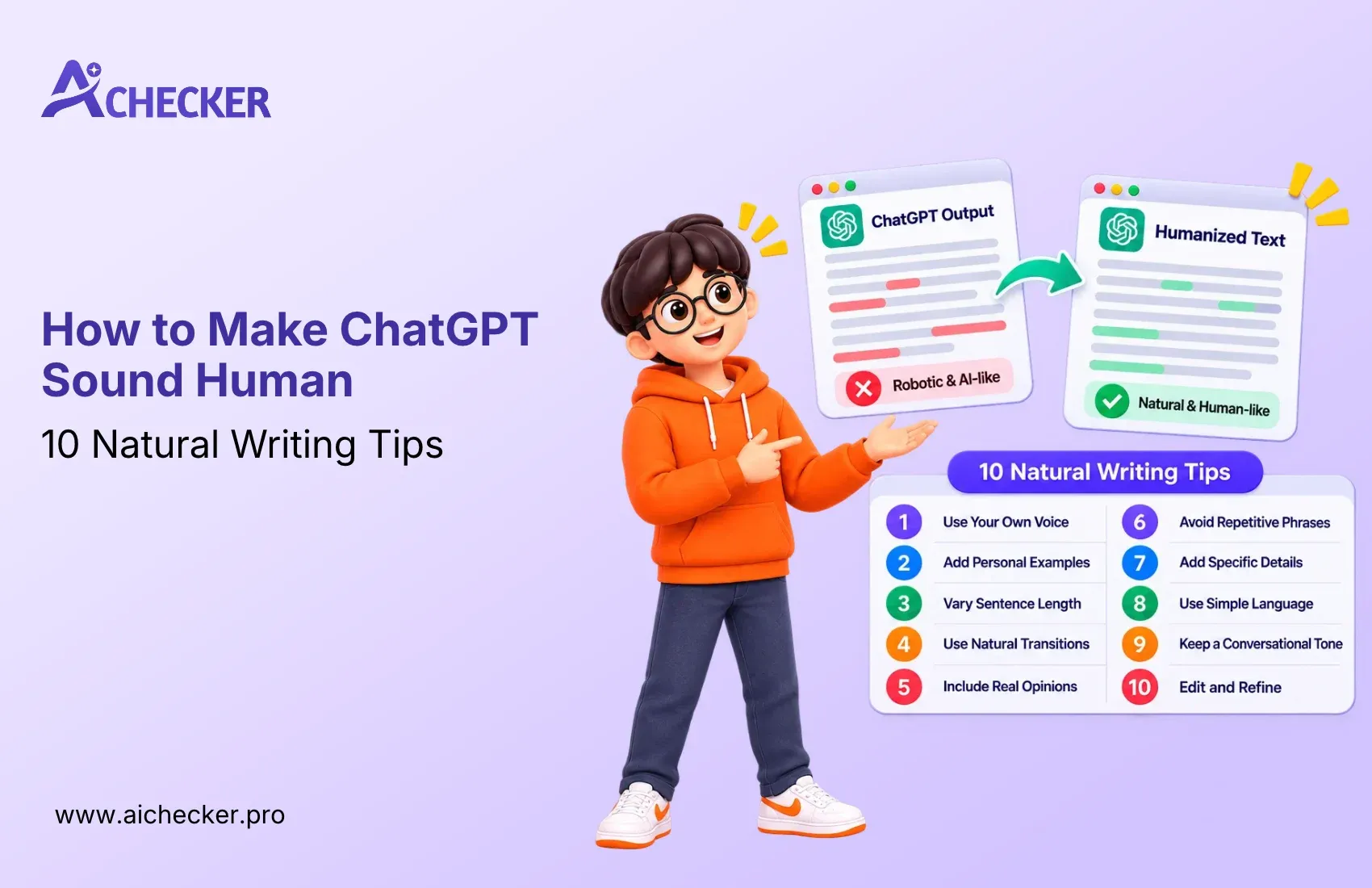
ChatGPT can help you write faster, but sometimes its writing sounds robotic, repetitive, or too formal. To make your content sound more natural, you need to use clear prompts, add your own ideas, and edit the final draft.
In this guide, I’ll share 10 simple tips to make ChatGPT writing sound more natural while keeping your original meaning. These tips can help you improve blog posts, college essays, emails, and product descriptions.
Key Highlights
- ChatGPT writing can sometimes sound robotic because it uses common words and repeated phrases.
- Sharing a sample of your own writing can help ChatGPT match your natural writing style.
- Using clear prompts, avoiding repeated phrases, and mixing short and long sentences can make your content sound more natural.
- Adding your own experiences, examples, facts, and opinions helps make your writing more personal.
- AI detectors are not always accurate, so focus on writing clearly and naturally instead of trying to pass every AI detection test.
- You can use a tool like AI Checker Pro as a final editing step, but always review the content yourself to make sure it is clear, accurate, and meaningful.
Get Lifetime Access with 60% OFF
Stop paying monthly subscriptions. Enjoy unlimited AI detection and humanizer access forever with future updates included.
- One-time payment
- Unlimited access forever
- All future updates included
Why ChatGPT Sounds Robotic in the First Place
ChatGPT sometimes sounds robotic because it uses common phrases, predictable sentence patterns, and a formal tone. When you ask it to write a blog post, email, or essay without clear instructions, it may produce content that feels too general or repetitive. The writing might be grammatically correct, but it can lack personal experiences, real examples, and opinions that make content interesting to read.
Another reason is that ChatGPT does not automatically know your personal writing style. It may use long sentences, unnecessary words, or phrases like “In today's digital world” and “It's important to note.” To make ChatGPT sound more human, you need to guide it with clear prompts, share examples of your writing, and add your own thoughts. The goal is not just to change the words but to make the content sound natural, clear, and meaningful to your readers.
How to check if content provides robotic Intent
Since, Humanized content feels now robotic, so it’s time to check how we can detect the robotic Intent. I’lll guide you in every step so you can Easily understand.
Step 1: Write a Sample of content through ChatGPT
Here, I will generate some sample of content through Perplexity where you can discriminate where issue is coming.
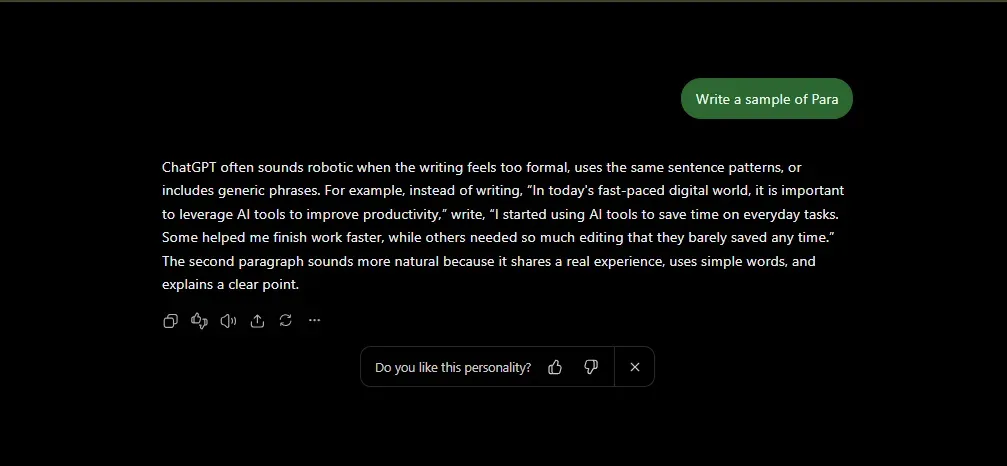 Content has been generated, but you can see, no any personalized Intent alos personal experience so it comes in robotic Intent.
Step 2: Check Chatgpt content in another Humanizer tool
Now, I’m going to check this robotic content into various humanizer tools so it will check is the problem resolved or not.
I’ll check to AI Humanizer tool which help to clear understand , also I humanize the para also check again it work or not.
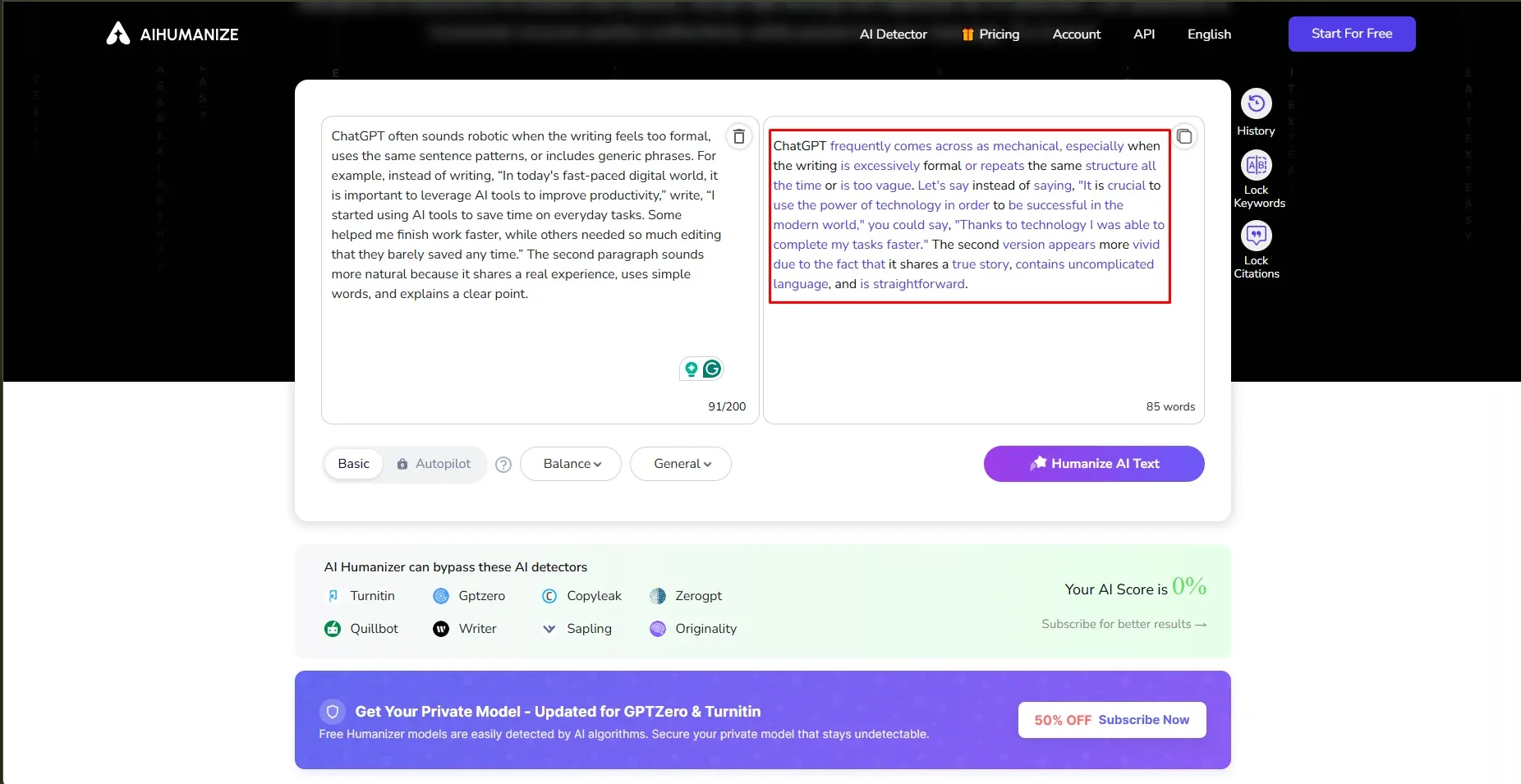 AI humanizer tool provides humanized content, but there is no personal intent or personal experience. I’m not satisfied with this tool. I want to check what results AI Checker Pro provides.
Step 3: Check again with AI Checker Pro
In this Step, I will test ChatGPT content with AI Checker Pro after the results came; I also really want to check if it feels robotic or not.
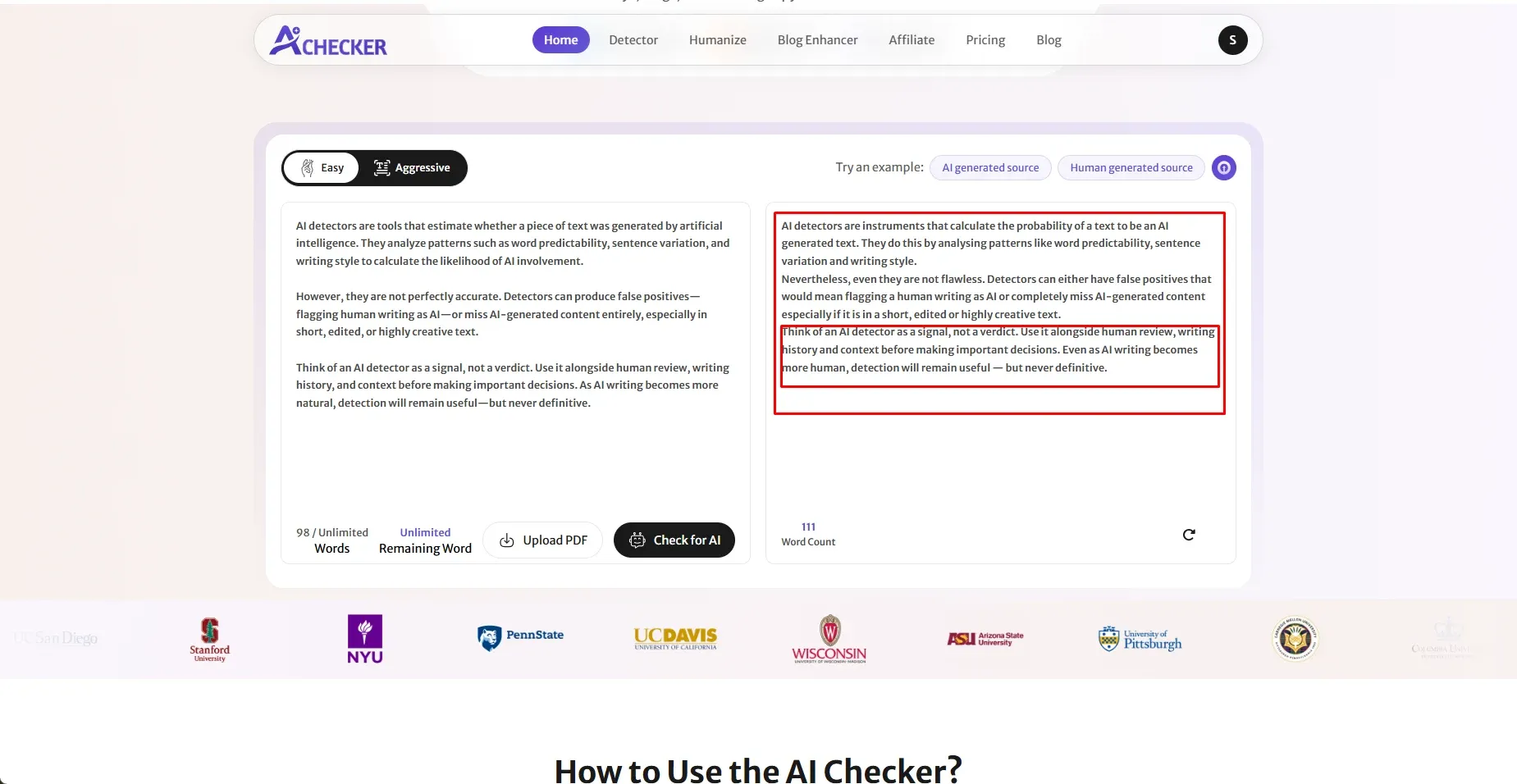 This second highlighted text will confirm that AI Checker Pro will provide a humanized format that also feels human. If you want to use ChatGPT, the content feels human. In next section, I’ll provide you real step where you can understand more clearer.
10 ChatGPT Writing Tips That Actually Worked
ChatGPT can write a clear blog post in seconds. The problem is that the first draft often sounds too formal, repeats common phrases, or explains things in a way that feels unnatural.
I've found that the solution isn't to ask ChatGPT to "write like a human" and hope for the best. You need to give it better instructions, show it what your writing looks like, and edit the result before publishing.
Here are 10 practical ChatGPT writing tips I would start with if you want your content to sound more natural.
1. Give ChatGPT a Clear Voice and Audience
When I first tried prompts like "Write a blog post about study habits," the results felt generic. The advice was correct, but it could have appeared on almost any website.
The problem was that I hadn't explained who the writer was or who would read the article.
Compare that prompt with this one:
"Write for first-year university students. Use a friendly, honest tone, as if you're advising a friend over coffee. Keep the language simple, use relatable examples, and avoid unnecessary explanations."
The second prompt gives ChatGPT a clearer direction.
Before asking it to write, decide who your readers are, what they already know, and how you want the content to sound. You should also mention anything you want it to avoid, such as formal language, long introductions, or unnecessary jargon.
Try this prompt:
"Write for [your audience] about [your topic]. Use a [friendly, professional, or conversational] tone. Explain ideas in simple language, include relevant examples, and avoid generic advice."
2. Give ChatGPT a Sample of Your Own Writing
This is one of the most useful ways to get content closer to your natural writing style.
Instead of asking ChatGPT to sound human, give it an example of how you actually write. Paste two or three paragraphs from an older blog post, email, or article that you like.
Then ask it to study your writing before creating anything new.
For example:
"Read this sample and describe my writing style. Look at my sentence length, word choice, tone, paragraph structure, and the way I explain ideas. Then write the new article in a similar style without copying any sentences from the sample."
This gives ChatGPT a real example to follow instead of leaving it to guess what "natural writing" means.
One thing to remember: don't just use any old sample. Choose a piece that sounds like you and reflects the kind of content you want to publish.
3. Tell ChatGPT Which Phrases to Avoid
Have you noticed how some AI-written articles start with phrases like "In today's fast-paced digital world" or "Let's dive into the details"?
These expressions aren't always wrong, but they can make your writing feel predictable when they appear again and again.
I recommend keeping a short list of phrases you don't want ChatGPT to use. Add to it whenever you notice wording that feels repetitive or doesn't match your style.
For example, you might avoid:
- In today's fast-paced world
- It is important to note that
- Unlock the power of
- A game changer
- Navigate the landscape
- In conclusion
You don't need to ban every common expression. Focus on phrases that add little meaning or don't sound like something you would naturally say.
Try this prompt:
"Avoid generic introductions, overused marketing phrases, and unnecessary transition sentences. Start with the actual problem, explain it clearly, and use specific examples where possible."
4. Vary Your Sentence Length
Read a few AI-generated paragraphs out loud. You may notice that many sentences have a similar length and follow the same pattern.
That steady rhythm can make the writing feel mechanical, even when the information is useful.
The solution isn't to make every sentence short. It's to give your writing a more natural rhythm.
For example, instead of writing:
"Planning your work helps you stay organized. It also improves your productivity. You can complete tasks more efficiently when you follow a clear schedule."
Try this prompt:
"Vary sentence length and structure naturally. Mix direct statements with longer explanations where needed. Avoid making every sentence follow the same pattern, but prioritize clarity over variation."
5. Add Real Examples and Personal Experience
ChatGPT can explain a concept, but it doesn't automatically know what happened during your workday, what you learned from a project, or which approach worked for you.
That information has to come from you.
Suppose you're writing about SEO audits. You could ask ChatGPT to explain why website rankings drop, but the explanation may sound like every other SEO article.
The content becomes more useful when you add a genuine observation, such as a technical issue you found during an audit, a change you made, or a result you measured.
Before drafting, share details that are relevant to the topic:
- A problem you encountered at work
- A tool you actually tested
- A result you recorded
- An opinion based on your experience
- A mistake you made and what you learned from it
You don't need a dramatic story in every article. Even one specific example can help readers understand the point.
6. Ask ChatGPT to Write More Conversationally
Sometimes, AI writing sounds like a textbook when the topic doesn't call for one.
You can make it easier to read by asking ChatGPT to explain the subject as if it were speaking to a real person.
For example, a sentence such as "Users should consider implementing an appropriate workflow to improve operational efficiency" could become "Start by choosing a workflow that wastes your team's time, then look for ways to make it simpler."
The second sentence gets to the point without unnecessary formal language.
You can also use contractions such as "it's," "you'll," and "don't" where they fit. Ask direct questions when they help the reader think about the topic, but don't force a question into every section.
Try this prompt:
"Explain the topic in a natural, conversational tone. Use simple words, contractions, and direct explanations. Write for someone who understands the problem but may be new to the solution. Avoid slang and forced jokes."
7. Write in Stages Instead of Asking for Everything at Once
Asking ChatGPT to research, outline, write, optimize, and edit a complete 2,000-word article in one prompt can produce a draft that's polished on the surface but weak in detail.
I prefer breaking the task into smaller stages so each part has a clear purpose.
Here's a simple workflow:
- Step 1: Create an outline: Ask ChatGPT to organize the topic into useful sections and identify questions the article should answer.
- Step 2: Review the outline: Remove overlapping headings and add missing information before drafting.
- Step 3: Write one section at a time: Give ChatGPT the relevant notes, examples, and instructions for each section.
- Step 4: Edit the draft: Check for repetition, unclear explanations, unsupported claims, and sections that don't answer the reader's question.
- Step 5: Proofread the final version: Check grammar, facts, links, and formatting yourself.
Working this way also makes it easier to maintain your voice throughout a long article.
When asking ChatGPT to rewrite an existing section, add one important instruction:
"Improve readability without changing the intended meaning, facts, names, dates, or numbers. Flag anything that needs verification."
8. Edit the Draft Yourself and Read It Out Loud
Even a detailed prompt cannot replace a careful edit.
Once ChatGPT finishes the draft, read it as if you were the person searching for the information. Does each paragraph help you understand something? Is the same point explained twice? Does the introduction take too long to reach the topic?
Here are a few checks I would make before publishing:
- Remove sentences that repeat information already explained.
- Replace vague statements with useful examples.
- Shorten sentences that contain too many ideas.
- Check whether each heading answers a relevant question.
- Read the text aloud and rewrite anything that feels awkward.
For example, "It is worth mentioning that this approach may help save time" can usually become "This approach may save time."
The meaning stays the same, but the second sentence gets to the point faster.
You don't need to rewrite every paragraph. Focus on the parts that feel unclear, repetitive, or unlike your usual writing.
9. Don't Force Every Section to Follow the Same Structure
ChatGPT often produces neatly balanced articles: three bullet points, three examples, and a summary at the end of every section.
That structure can be useful, but it isn't always the best fit.
Some ideas need a detailed explanation and a real example. Others need only a couple of sentences. Giving every section the same length can make an article feel repetitive.
Instead, organize each section around the information the reader needs.
For example, a tutorial may need numbered steps. A product comparison may work better as a table. An article about a common mistake may need a short explanation followed by a practical example.
Try this prompt:
"Choose the structure that best explains each idea. Use headings, paragraphs, lists, or examples where they improve readability. Avoid repeating the same structure in every section, and don't add a summary when it simply repeats what the reader has already learned."
10. Use an AI Writing Tool for a Final Review
After editing the article, you may still want another way to review the wording.
An AI writing tool can help you identify sentences that may need attention, especially when you're working with a long draft.
For example, AI Checker Pro provides sentence-level AI detection results and includes an AI humanizer. You can use these features to review your draft and find passages worth examining more closely.
I would use a tool like this as an additional check, not as a replacement for editing. If a sentence is flagged, read it again and ask yourself whether it is vague, repetitive, overly formal, or missing a concrete example. Rewrite it where necessary, and make sure the revised version still reflects your intended meaning.
Before and After: How a Simple Prompt Changes the Writing
To understand the difference, let's use a simple example about time management for college students.
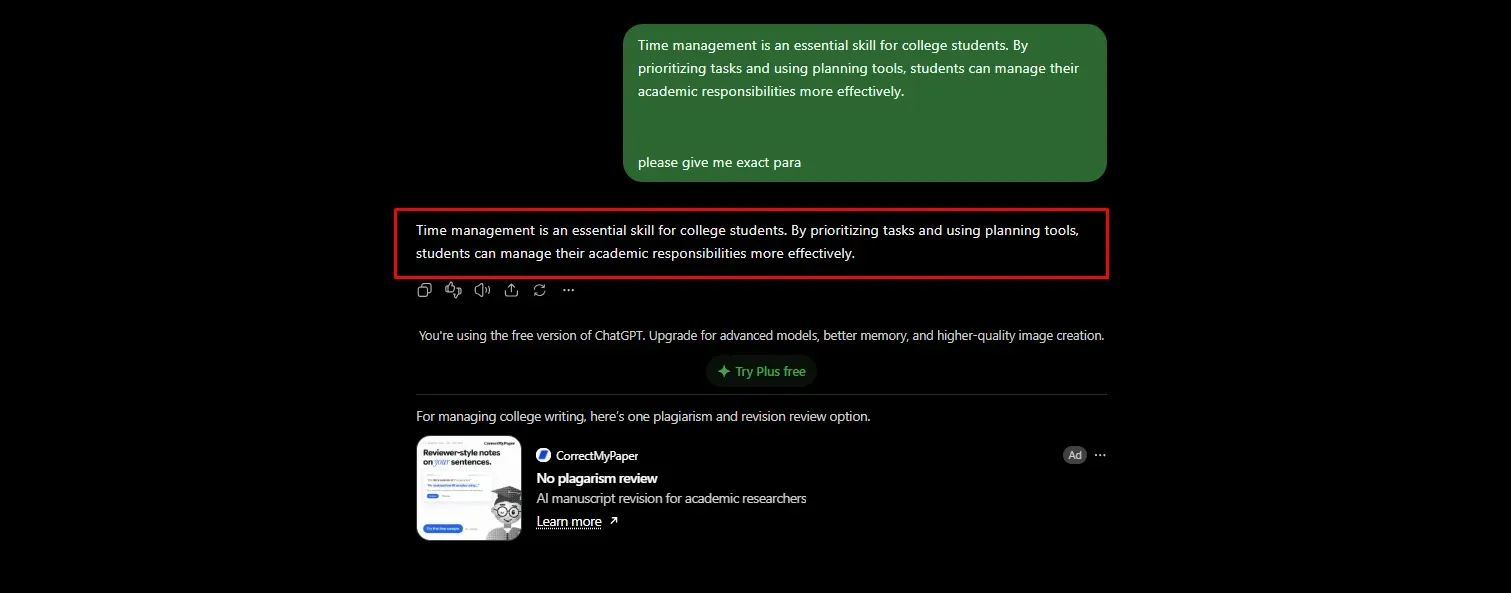
Before: A basic ChatGPT prompt
Time management is an essential skill for college students. By prioritizing tasks and using planning tools, students can manage their academic responsibilities more effectively.
There is nothing wrong with the grammar, but the paragraph feels generic. It explains the benefit without giving readers anything specific to relate to.
 After: A more natural version
I kept telling myself I'd study tomorrow, but tomorrow always turned into another late night before an exam. What helped was keeping things simple: writing down three tasks for the day, using a paper planner, and putting my phone away while studying.
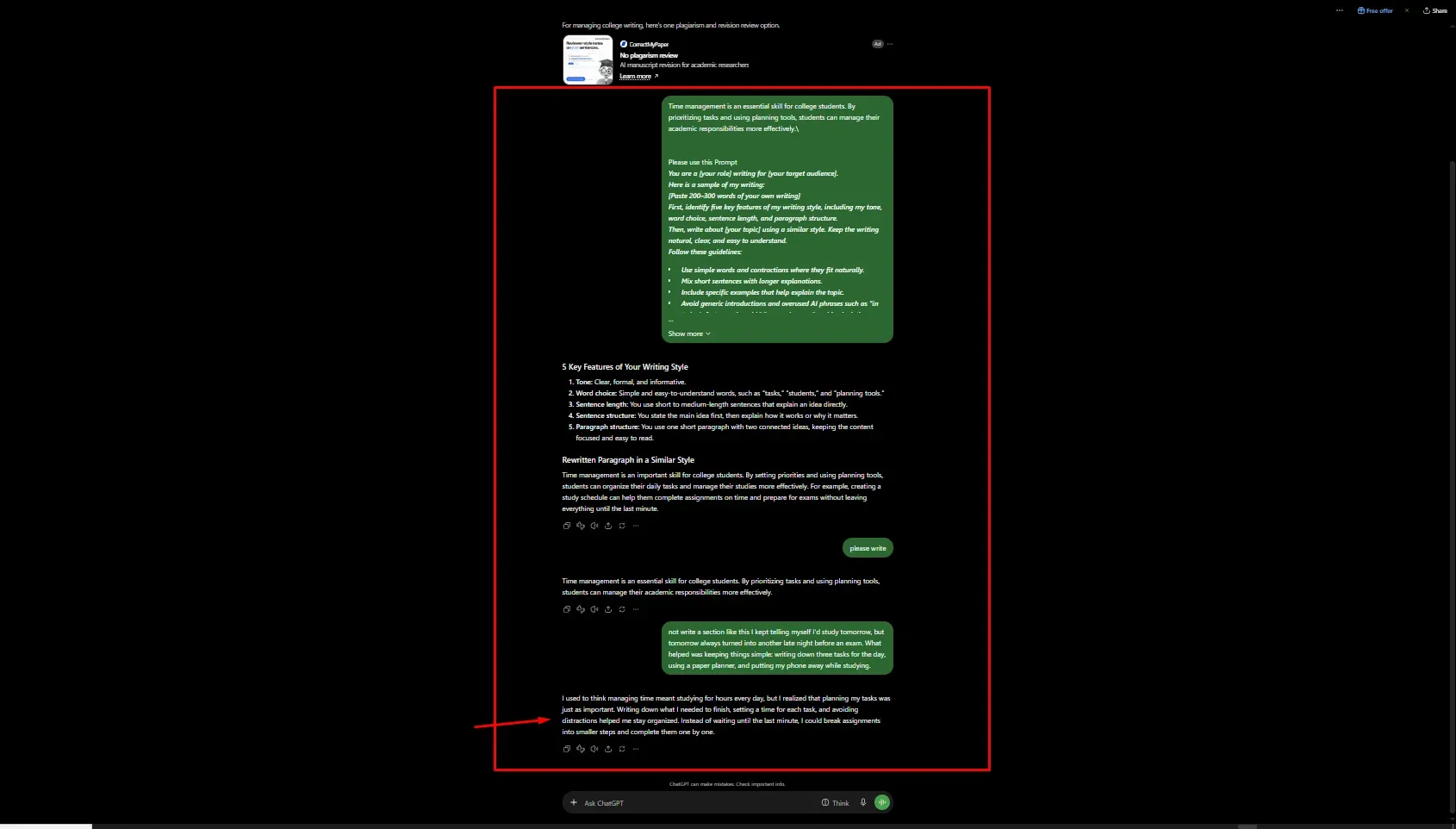 The second version uses a familiar situation and specific details to explain the same topic. It feels more conversational because it shows what the problem looks like in everyday life instead of simply describing it.
This is where better prompts and human editing can help. Give ChatGPT enough context to understand your audience, add real examples from your own experience, and remove sentences that sound too general.
That's a practical way to make ChatGPT writing sound more human without making it complicated or changing the original message.
Will Humanized ChatGPT Text Still Get Flagged?
Yes, humanized ChatGPT text can still be flagged by AI detectors. I’ve learned that making AI-written content sound more natural does not automatically make it original or guarantee that a detector will identify it as human-written. Tools such as Turnitin, GPTZero, Originality.ai, and Copyleaks may give different results for the same piece of content.
While reviewing AI detection tools and humanizers, one thing became clear to me: making a paragraph sound natural and making it genuinely useful are two different things. Replacing a few words or changing sentence structures may improve readability, but it does not always add the personal experience, specific examples, or original ideas that readers expect.
Here are three things I keep in mind when checking humanized content:
- False positives can happen. Human-written content may be flagged as AI-generated, particularly when the writing follows formal or predictable patterns. Non-native English speakers may also face challenges with some detection systems.
- Edited AI text can be difficult to assess. Rewriting or humanizing AI-generated content can change detector results, but no editing method guarantees a particular score.
- Content quality matters more than chasing a score. For SEO, I focus on whether the content answers the reader’s question, provides useful information, and adds original value. Google’s guidance focuses on helpful, reliable content rather than whether AI was used to create it.
So, what should you do if your content gets flagged? My advice is to keep your research notes, outlines, drafts, and version history. These records can help explain how you developed your work. Before publishing, review the content carefully, add relevant examples, and make sure every claim is accurate.
How AI Checker Pro Compares to Other Tools
Once you know how to make ChatGPT sound human, you still need a way to check your work. I use several tools when I test, because each one has a different strength. This table reflects my own testing and general public knowledge, not a formal study.
| Tool | Accuracy Notes | Free Tier | Humanizer Included | Best For |
|---|---|---|---|---|
| AI Checker Pro | Sentence-level detection, works with ChatGPT, GPT -4, GPT -5, Gemini, Claude | Check the pricing page | Yes | Students, bloggers, and agencies who want to detect and fix in one place |
| GPTZero | Popular and easy to use, but false positives are reported | Yes, limited use | No | Teachers wanting a quick check |
| Originality.ai | Built with web publishers in mind, still not 100% accurate | Paid, credit-based | No | SEO teams and content agencies |
| Turnitin | Built into school systems, and schools differ on how they use it | Schools only | No | Institutions |
My honest take: use a detector as a guide, not a judge. The better habit is to fix the writing itself.
Conclusion
When I work on ChatGPT content, I’ve found that changing a few words is not enough to make the writing feel natural. What makes the real difference is adding my own examples, sharing specific experiences, and editing sentences that sound too common or robotic.
My approach is simple: start with clear instructions, avoid overused phrases, write one section at a time, and read the final draft as if I were explaining the topic to someone. I also use AI humanizers when I need help improving the flow, but I never treat their output as final. I still review the content and add my own thoughts before publishing.
If you want to learn how to make ChatGPT sound human, start with one paragraph today. Write it using a basic prompt, edit it in your own voice, and compare both versions. You may find that a few thoughtful changes make a bigger difference than rewriting the entire piece.
FAQs
How do you make ChatGPT sound human?
Why does ChatGPT sound so robotic?
What prompts make ChatGPT sound human?
How do you make ChatGPT write like you?
Can you humanize ChatGPT text for free?
How do you make ChatGPT less robotic?
Which phrases should you ban to make ChatGPT sound natural?
Will humanized ChatGPT text still get flagged by AI detectors?
Does editing ChatGPT writing change its meaning?
How can you make ChatGPT sound more conversational?

Harshil Barvaliya
SEO Executive & Content Writer at AI Checker Pro
I’m Harshil Barvaliya, an SEO Executive and Content Writer at AI Checker Pro. I focus on improving the website’s search engine visibility through effective SEO strategies, including keyword research, on-page and off-page optimization, and content development.Get Started Free
Create a free account for advanced AI detection and scan history.
Trusted by thousands worldwide.
Recent Blog's
Discover how AI-powered content creation can elevate your website's reach and engage your audience like never before. Explore the real impact of AI on crafting content that connects.