Does Google Docs Detect AI Writing? What Google Docs Can and Can't Do (2027 Guide)
TABLE OF CONTENTS
The Short Answer: Does Google Docs Detect AI?
Does Google Docs Have an AI Detector Built In?
What Google Docs Can Track About How You Write
Google Docs Version History and AI Writing
How Teachers Actually Check Google Docs for AI Writing
Does Google Docs Detect AI Paraphrasing or ChatGPT Text?
Does Google Docs Detect AI for Bloggers and SEO?
How to Check AI Generated Content in Google Docs
Practical Tips for Students, Teachers, and Bloggers
Conclusion
FAQs
Get an AI summary of this post on:





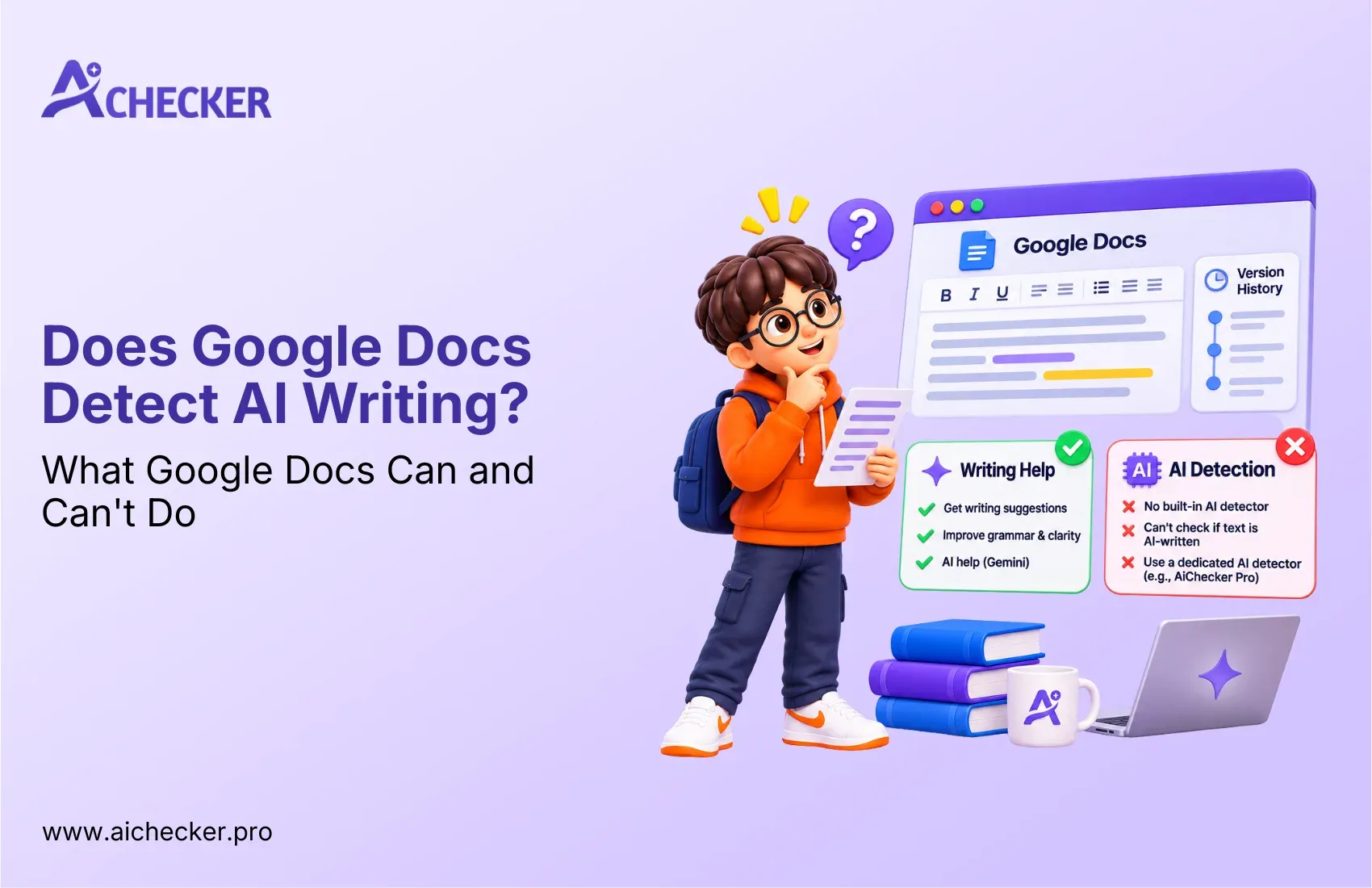
So, does Google Docs detect AI writing the moment you paste in a ChatGPT answer? It's one of the most common questions I hear from students, bloggers, and teachers, and the honest answer is more interesting than a simple yes or no. Google Docs has no true AI checker, but your document still leaves a trail.
Let me explain this in a simple way. Google Docs tracks how a document is built, and many teachers know how to read that history. So when people ask does Google Docs detect AI, the real answer has layers. Below, you'll see what Google Docs can and can't do, and here is what actually works in 2027. If you want a broader look at the tools schools rely on, start with this guide on what AI detector do colleges use.
The Short Answer: Does Google Docs Detect AI?
No, not on its own. Google Docs does not scan your writing and label it as machine made. There's no percentage score, no red highlight, and no warning banner. Does Google Docs show if text is AI generated? No. If you paste a paragraph from ChatGPT, Gemini, or Claude, the editor treats it like any other text.
But here's the catch. Your school, your teacher, or your client may run your file through a separate tool, and Google Docs also keeps a detailed edit history. So the better question is who else is looking at your document and what they can see. Does Google Docs detect AI? Not directly, but the surrounding tools matter.
I've tested a lot of AI detectors, and honestly most of them are not reliable when used alone. Context matters when you ask does Google Docs detect AI, and that's true for teachers and bloggers alike.
Does Google Docs Have an AI Detector Built In?
Short answer: no. When people ask does Google Docs have an AI detector, they're hoping for a hidden menu option, and it doesn't exist. Google Docs has spell check, grammar suggestions, and Gemini powered writing help on some plans, but nothing that scores text as human or AI. If you're searching for a Google Docs AI checker, you'll need a separate tool. The same question comes up for other platforms too, such as whether Google Classroom has an AI detector.
Google has done research on watermarking text made by its own models, called SynthID. That's a separate system, not a button inside your document, so don't count on it as a classroom tool.
Here is what you will find inside Google Docs:
- Grammar and spelling suggestions
- Word count and document outline
- Version history and comments
- Gemini writing help on supported plans
None of these is a Google Docs AI detection feature. So does Google Docs detect AI through any built in tool? Not at all. Google may add new features over time, so check Google's help pages if you want the latest details.

Get Lifetime Access with 60% OFF
Stop paying monthly subscriptions. Enjoy unlimited AI detection and humanizer access forever with future updates included.
- One-time payment
- Unlimited access forever
- All future updates included
What Google Docs Can Track About How You Write
Even without a checker, Google Docs tracks plenty. This is where the real story sits for AI detection in Google Docs.
Your document history can show:
- Who edited the file and when
- How long you spent writing
- Whether text appeared in big chunks or was typed slowly
- Every earlier version, saved automatically
Picture a US college student turning in a 1,500 word essay for an English 101 class. If the history shows one single paste at 11:58 PM and nothing else, that looks different from an essay built over three days with edits, deleted lines, and rewrites.
Does Google Docs flag AI generated essays based on this? No, it only records the timeline. Does Google Docs detect AI from timestamps alone? Also no, but a teacher can read the pattern. Neither pattern proves anything on its own, because people paste from their own notes all the time. It's a signal, though, and teachers know it.
Google Docs Version History and AI Writing
Let me be clear about Google Docs version history AI detection. Version history never says AI wrote this. It only shows what changed and when, and a person still has to interpret it. Can Google Docs version history detect AI writing? Not directly, but a timeline can raise questions. So does Google Docs detect AI through its history? Not on its own.
Some teachers also use Chrome extensions like Draftback, which replays a document's typing history like a video. Others use tools such as Grammarly Authorship, which records how text was created. If you're curious about that side of things, here's a breakdown of whether Grammarly gets flagged as AI.
What a suspicious history looks like
- The whole essay arrives in one or two big pastes
- Almost no deletions or rewrites
- Polished paragraphs with no earlier drafts
- Edits only in the last few minutes before a deadline
What a normal history looks like
Typing in bursts, moving paragraphs around, fixing awkward lines, and returning to the file on different days. That's how most real writing happens.
My honest advice: write inside the document you plan to submit and keep your drafts. It protects you if anyone asks questions.
How Teachers Actually Check Google Docs for AI Writing
Can teachers detect AI writing in Google Docs? Yes, but not through Docs itself. Anyone asking does Google Docs detect AI usually ends up with outside tools. Here's what I've seen schools actually use:
- Turnitin AI detection, usually through the school's learning system
- GPTZero, which many teachers paste text into
- Google Classroom originality reports, which check for plagiarism and not AI
- Manual review of version history
- Oral follow up questions about the essay
Can schools track AI writing through Google Docs? Mostly through those outside tools plus history checks. In practice, Google Docs AI writing detection means a mix of separate software and human judgment. For a closer look at the process, see how professors check for AI writing.
One thing matters here: no detector is perfect. Turnitin and GPTZero can give false positives, and students have been flagged for writing they did themselves. Many universities have warned instructors not to treat a score as final proof. If you're a teacher, use a score as one clue, then talk to the student. If you're a student, keep your drafts.
At many US colleges, instructors set their own AI policies, and some allow limited use with disclosure. Check the syllabus before you assume anything.
Does Google Docs Detect AI Paraphrasing or ChatGPT Text?
Google Docs ChatGPT detection is not a feature. Can Google Docs detect ChatGPT written text? No. Docs can't tell whether words came from ChatGPT, a friend, or your own brain. Can Google Docs detect AI paraphrasing? Not by itself either.
Outside detectors look at patterns like predictable word choice and very even sentence rhythm, often described as perplexity and burstiness. Paraphrasing tools often leave those patterns in place, so a reworded paragraph can still get flagged. So does Google Docs detect AI paraphrasing? No, but other tools might. I've run lightly paraphrased text through several checkers and got very different scores each time. That's why one score should never be the final word.
Ever wondered why two detectors can give two different scores on the same paragraph? Each one is trained differently.
Here's an example. A student at a state university runs a ChatGPT paragraph through a paraphrasing app, pastes it into Google Docs, and submits. Docs says nothing. But Turnitin may still flag it, and the version history would still show the paragraph arriving fully formed.
Does Google Docs Detect AI for Bloggers and SEO?
Bloggers ask a different version of the same question. If you draft in Google Docs and publish on WordPress, does Google Docs detect AI and report it to Google Search? No. Docs and Search don't work that way.
Google's public position is that it rewards helpful, original content made for people and targets spam, no matter how the content is made. So your real SEO risk is thin, generic writing, not the editor you used. I've seen blogs lose traffic because every post sounded the same, and that had nothing to do with Google Docs. If this worries you, read whether Google penalizes AI content.
Here's an example. A small marketing agency in Texas drafts client posts in Google Docs with help from AI, then edits each one with real customer stories and local details. Those posts read like a person wrote them, and that's what readers and search engines respond to.
Here's what I'd watch for in your drafts:
- Generic intros that sound like every other article
- No personal experience or examples
- Repeated phrases and stiff sentence rhythm
- Facts that were never checked
Run a draft through a detector, then edit it until it sounds like you. A blog enhancer can help you polish the final version.
How to Check AI Generated Content in Google Docs
Since the answer to does Google Docs detect AI is no, and there's no Google Docs AI checker inside the app, you need a separate tool. Tools like AI Checker Pro help you detect AI content accurately, and it's easy to use. Here's the simple process to detect AI writing in Google Docs:
- Open your document and copy the text.
- Paste it into AI Checker Pro.
- Read the sentence level results to see which lines look machine written.
- Rewrite those lines in your own voice, or use the AI humanizer included in the tool.
- Recheck, and keep your version history intact.
AI Checker Pro works with ChatGPT, GPT 4, GPT 5, Gemini, and Claude, and it's used by 100K+ users. Instead of rewriting manually, many users now rely on AI Checker Pro to save time. I have personally seen bloggers clean their content using AI Checker Pro, then add their own examples on top.
Practical Tips for Students, Teachers, and Bloggers
No matter how you answer does Google Docs detect AI for your own situation, a few habits help everyone:
- Students: write and edit inside one Google Doc, save your drafts, and use AI for brainstorming or outlines instead of full essays. Check your school's policy first. You can also check your essay before submission.
- Teachers: read version history, ask students to explain their argument out loud, and treat detector scores as one clue.
- Bloggers: add real examples, fix stiff phrasing, and check every fact before publishing.
- Businesses: set a simple review step so every piece sounds like your brand.
Conclusion
So, does Google Docs detect AI? Not directly. Google Docs has no AI checker, no score, and no warning label. But version history, Turnitin, GPTZero, and a teacher's own judgment can still raise questions. If you use AI, treat it as a helper, keep your drafts, and make the final writing sound like you. A tool like AI Checker Pro can show you which sentences look machine written before anyone else does. Write honestly, check carefully, and you'll be fine. I hope this clears things up for you.
FAQs
Does Google Docs have a built in AI detector?
Can Google Docs detect ChatGPT written text?
Can teachers tell if an essay was pasted into Google Docs?
Does Google Docs version history reveal AI written content?
Can Google Docs detect AI paraphrasing?
How can you check Google Docs text for AI generated content?
Can teachers detect AI writing in Google Docs?
Can schools track AI writing through Google Docs?
Does Google Docs flag AI generated essays?
Does Google penalize AI content drafted in Google Docs?

Harshil Barvaliya
SEO Executive & Content Writer at AI Checker Pro
I’m Harshil Barvaliya, an SEO Executive and Content Writer at AI Checker Pro. I focus on improving the website’s search engine visibility through effective SEO strategies, including keyword research, on-page and off-page optimization, and content development.Get Started Free
Create a free account for advanced AI detection and scan history.
Trusted by thousands worldwide.
Recent Blog's
Discover how AI-powered content creation can elevate your website's reach and engage your audience like never before. Explore the real impact of AI on crafting content that connects.