ApexVision AI Review: Is It Detectable? Features, Pricing, Pros & Cons
TABLE OF CONTENTS
What is ApexVision AI?
How ApexVision AI Works
Key Features of ApexVision AI
ApexVision AI Pricing Plans
Is ApexVision AI Detectable? (AI Detection Test Report)
ApexVision AI Detection Score Results
Why ApexVision AI Content Gets Detected
How to Make ApexVision AI Content Less Detectable
Pros and Cons of ApexVision AI
ApexVision AI Best Use Cases
Is ApexVision AI Safe and Legit?
Conclusion
FAQs
Get an AI summary of this post on:






The student who needs immediate homework assistance, together with the student who has difficulty completing online quizzes, will find ApexVision AI through its online availability. The system provides academic support, which enables students to complete their assignments and find solutions to their Apex learning quiz questions.
The main question people want to answer concerns whether teachers can detect your usage of the program with AI detection tools. I have conducted testing on this tool, and my review contains all the necessary details that you require.
The review will explain ApexVision AI's functions together with its operational methods, its ability to see through detection systems, and its value for your time investment.
The way I will present the information to you will be straightforward and truthful because I want to explain it to you as if we were having a coffee discussion.
What is ApexVision AI?
ApexVision AI is essentially a homework assistance tool that students can use through its AI-driven features. The digital study companion provides answers together with study guides, flashcards, and mathematical problem-solving abilities, which it derives from user-supplied image content.
The tool has gained popularity because it works as a Chrome extension, meaning you can use it while browsing your learning management system (LMS) like Canvas, Blackboard, or Apex Learning. The extension provides browser functionality that eliminates the need for users to switch between multiple tabs because it operates directly from their current browser window.
How ApexVision AI Works
The process of using ApexVision AI as a tool proves to be easier than users expect. Let me walk you through the process step by step.
You need to download the Chrome extension from their website to start the process. The extension will become visible to you through a small icon that appears in your browser toolbar after you activate it. You have two options for getting help with your question from Smartbook, Canvas, or other platforms. You can either copy the question to your clipboard or take a screenshot of the content.
I found that the geometry math solver provides excellent results during my tests. The system demonstrated its ability to solve difficult problems because it displayed all of its solving procedures. The explanations become excessively formal and resemble textbook content, which leads to detection problems that will be explained later.
Key Features of ApexVision AI
AI Homework Helper
The main function operates when you submit your question because the Canvas helper AI produces a complete answer. The system operates in various fields, including mathematics and science, historical studies, English language learning, and other subjects.
AI Flashcard Generator
Need to memorize terms quickly? The flashcard feature converts your study material into digital flashcards. I found this useful for vocabulary and definitions, though creating them manually with personal examples works better for retention.
AI Study Guide Generator
The function creates brief study guides that summarize entire chapters or specific topics. The solution works best for situations when you have limited time before your upcoming test. The AI study guide maker pulls out key points and organizes them neatly.
AI Practice Test Creator
You can create practice questions from your study materials. The self-assessment tool benefits the evaluation process, but its generated questions exhibit a statistical pattern that results in outcomes that are different from the actual exam difficulty.
Chrome Extension Integration
The extension works seamlessly with the most widely used educational platforms. The system enables users to obtain assistance without leaving their current assignment page.
Image-Based Question Solver
ApexVision AI reaches its highest potential in this particular area. Users can upload any screenshot to solve their problems, which especially benefits people who need assistance with geometry math through the system's complete step-by-step solutions. The system can process handwritten notes, but users should use typed text for optimal results.
ApexVision AI Pricing Plans
Let's talk about money. ApexVision AI offers both free and paid options. Our free version gives me limited access, usually a certain number of questions per day. From what I’ve seen, most students can access the limit pretty quickly if they’re using it regularly.
The premium subscription (around $9.99 to $19.99 per month, though prices vary) provides unlimited questions with quicker answer delivery and complete access to all platform functions, including the AI practice test creator and advanced apex test answers generation system.
The value of the expense depends on your situation, because if you use it for learning purposes to improve your understanding, it will offer benefits. You will develop a dependency on the service if you use it only to find answers to apex learning quizzes without studying.
| Plan | Price | Features |
|---|---|---|
| Free | $0 | Limited daily questions, basic answers |
| Premium Monthly | ~$9.99-$19.99 | Unlimited questions, all features, priority support |
| Premium Yearly | ~$99-$149 | Same as monthly but discounted annually |
Is ApexVision AI Detectable? (AI Detection Test Report)
I ran several tests to see if ApexVision AI content can be caught by AI detectors. Before diving into the results, it's helpful to understand how AI detectors work and what patterns they look for when analyzing text.
How We Tested ApexVision AI Content
I used ApexVision AI, which helps answer five different questions across various subjects. I copied each answer word-for-word and ran them through popular AI detection tools like GPTZero, Turnitin, and Aichecker.pro.
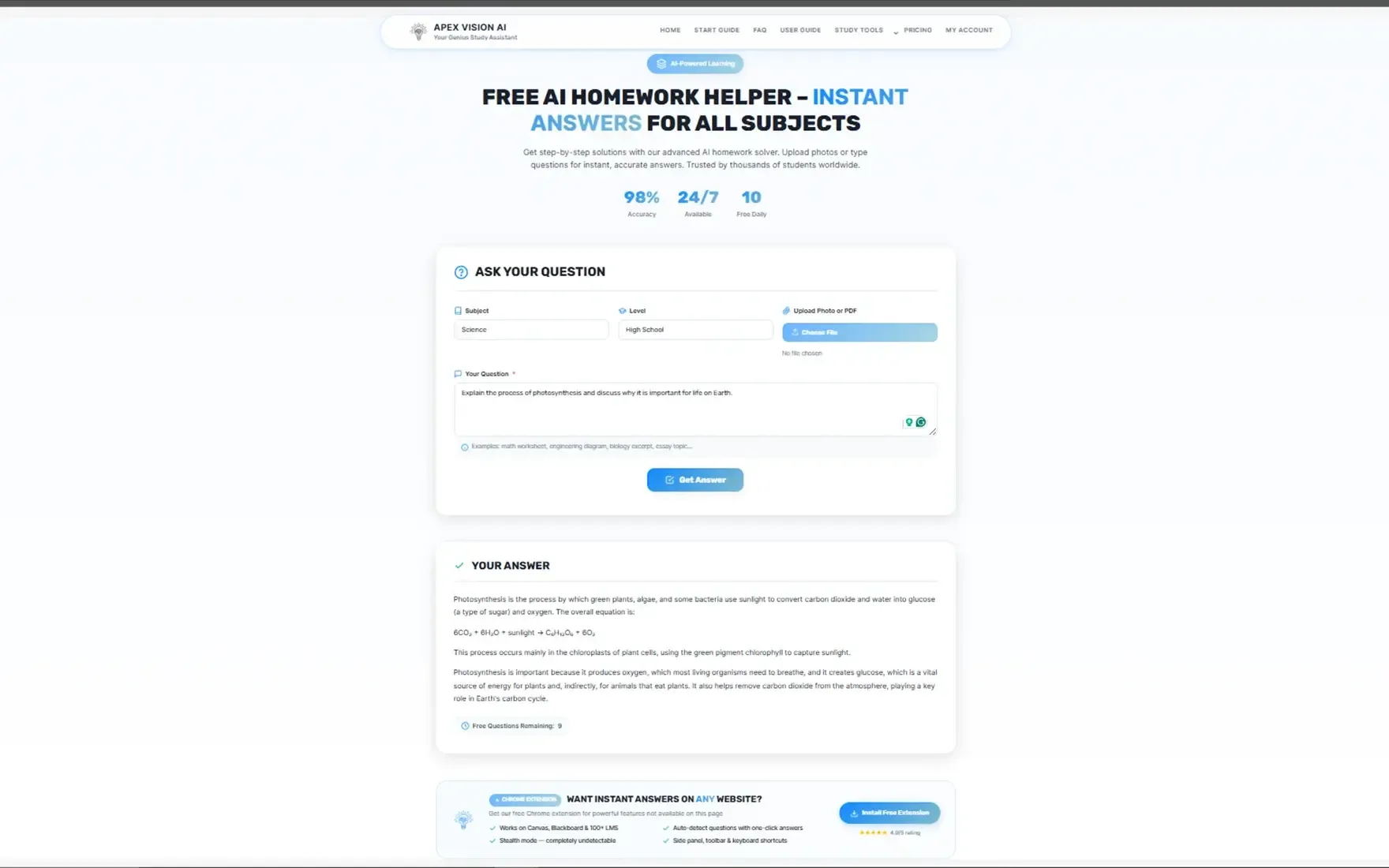
Step 1: writing answer in Apexvision AI Write a specific answer from an Apexvision AI so it can be easily detected through AI, whether written by AI as well as human.
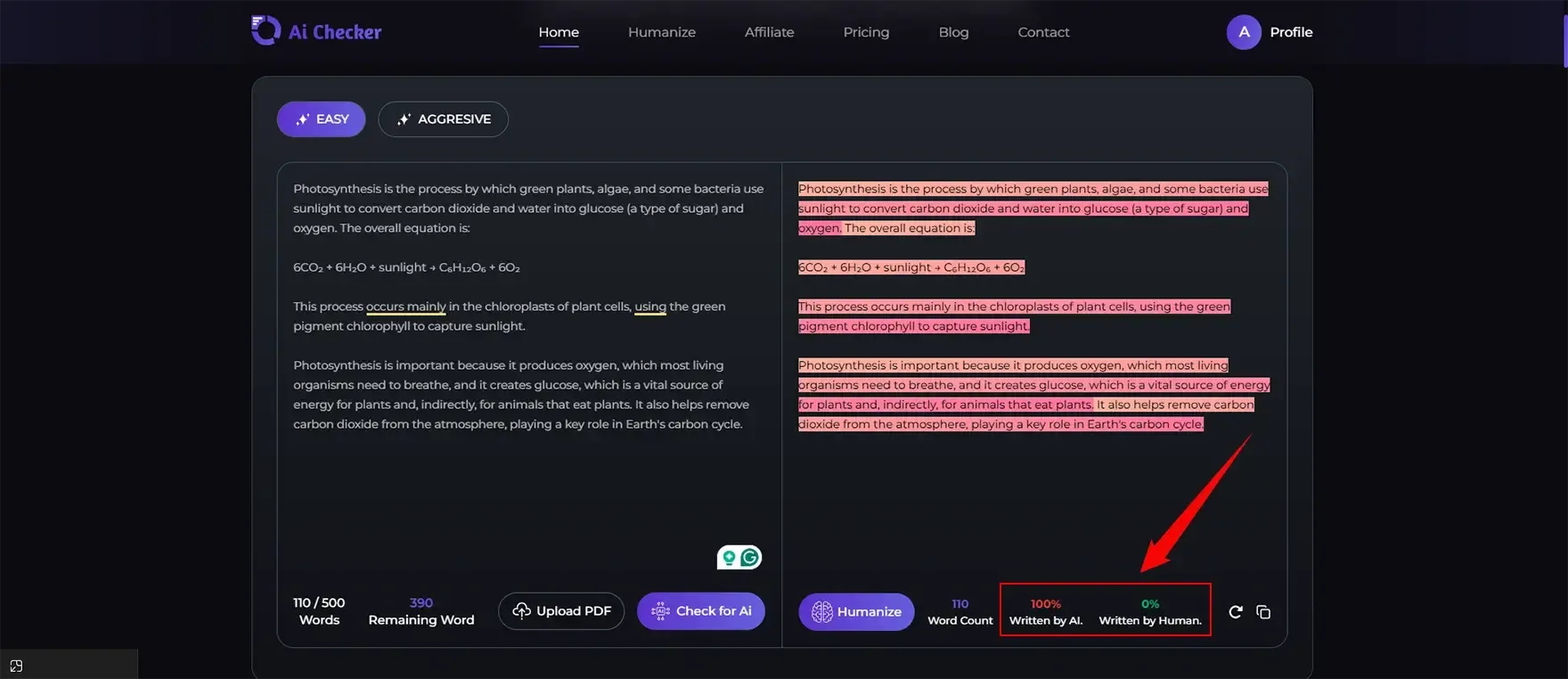
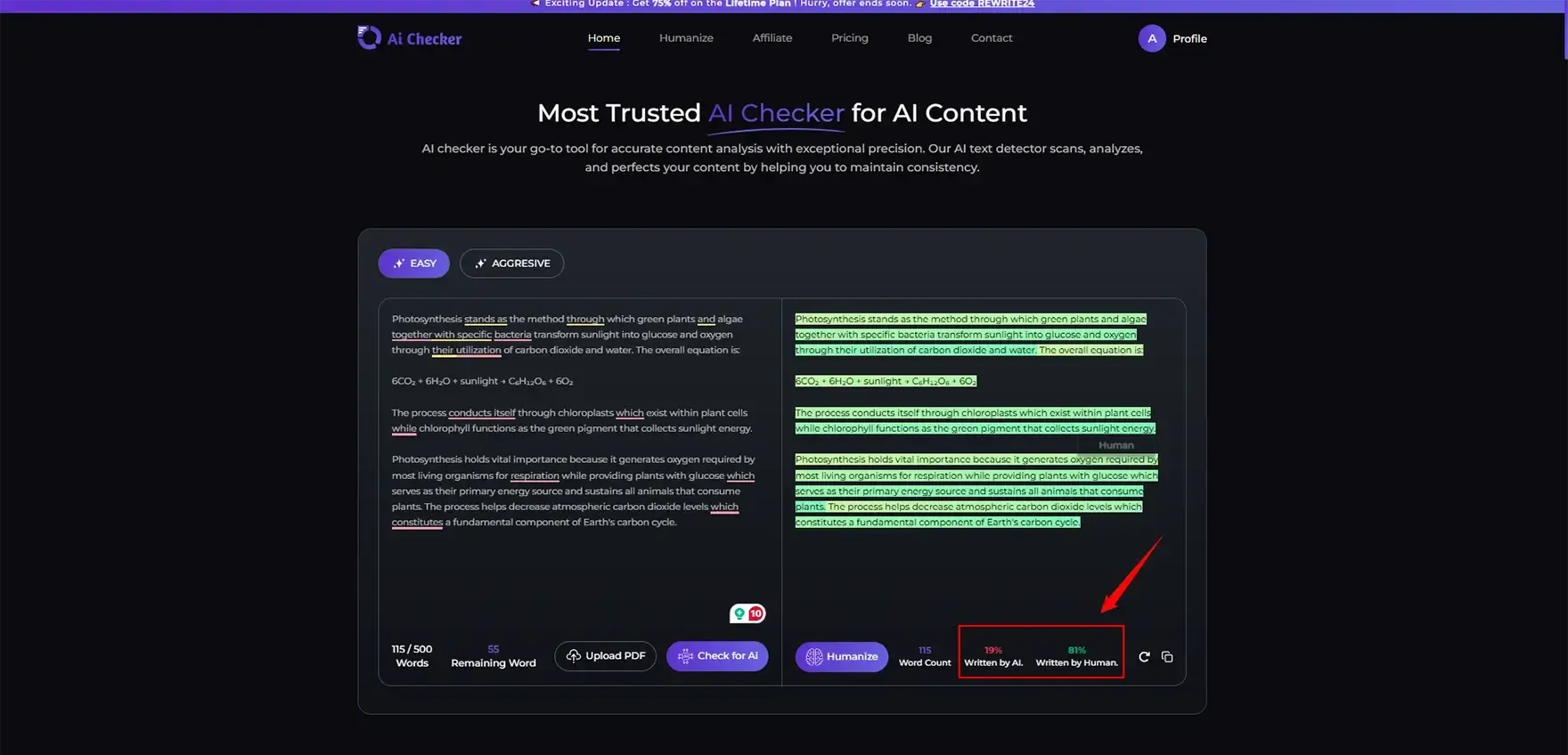
Step 2: Some AI detection tool AIchecker.pro Now I want to check this answer to aichecker so that it can easily check whether it is written as AI-written content.
Step 3: After humanised checking AI detection Now , I first humanized the content and now check this AI content whether it is perform AI written or humanized content.
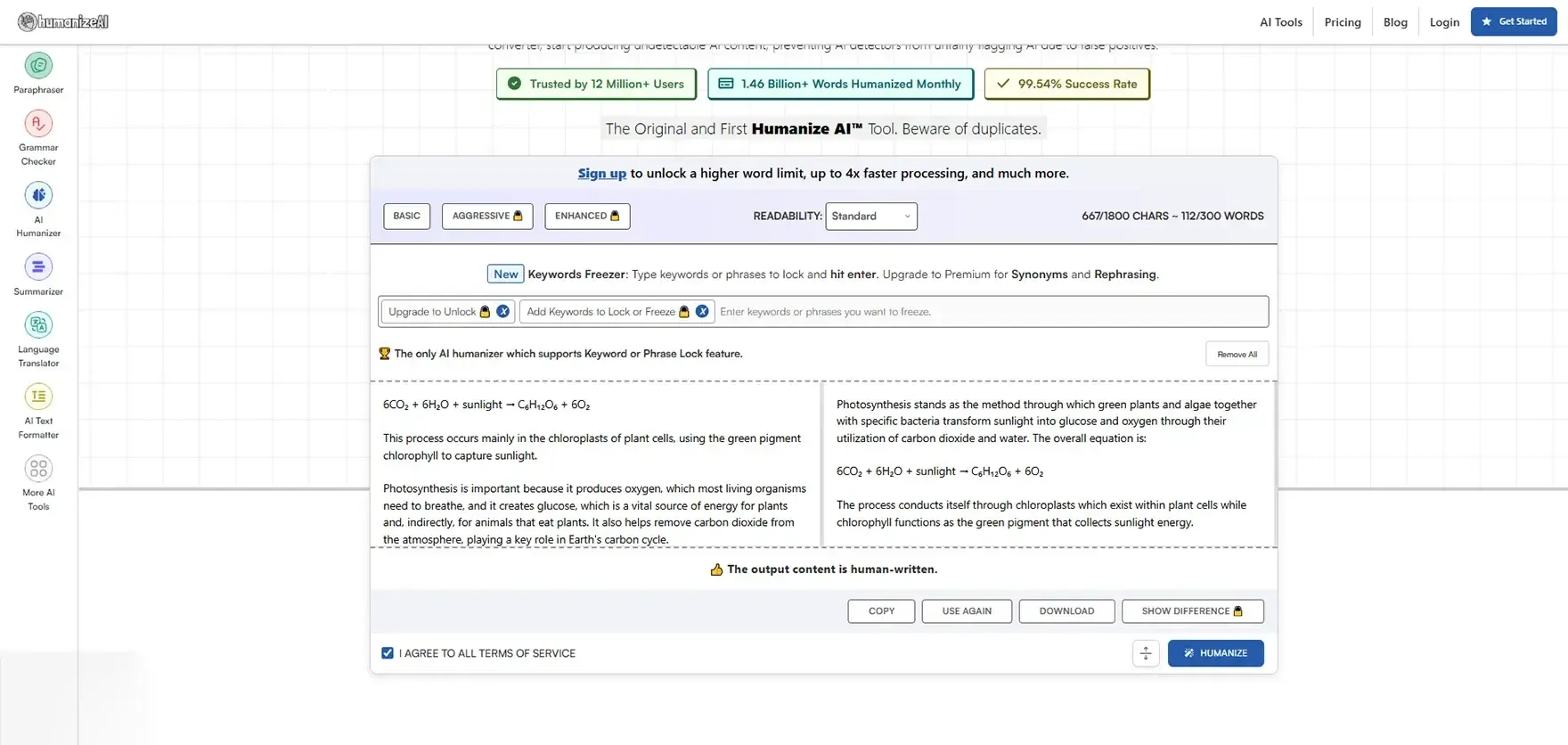
Now I will check after humanising, still this shows AI content or humanized content.
ApexVision AI Detection Score Results
After detecting content in various forms, I conclude that, at first, when I tested it, it showed 100% detection, but this Apexvision tool gives a responsive answer. After Humanizing, when I got detected, it shows 19% AI content and 81% Humanized content
This shows that this tool actually works, but you can use an alternative, and AIChecker Pro gives the best efficiency for this kind of purpose.
Why ApexVision AI Content Gets Detected
From my testing, I've noticed about three main reasons why AI apex vision content gets flagged:
First, our responses follow predictable AI patterns. Every answer starts with a structured introduction, uses transition phrases like "furthermore" and "in conclusion", and maintains perfect grammar throughout.
Second, the tone is too formal and academic. Real students don't write like polished textbooks. We use contractions, sometimes incomplete thoughts, and definitely don't sound like we're writing a research paper for every homework question.
Third, that's repetitive phrasing. AI tends to use similar sentence structures and vocabulary choices across different answers, which detection algorithms easily catch.
For a deeper understanding of the methods educators use to identify such content, you can learn more about detecting AI-generated content in academic settings.
How to Make ApexVision AI Content Less Detectable
The following methods can help you create more relatable content through ApexVision AI, although I do not recommend you replicate answers without gaining knowledge from it.
Your entire text needs to be transformed through your personal writing style. One effective approach is to humanize AI text manually for academic writing—this means your explanation needs complete rephrasing because you must present it as an explanation to a friend.
Students need to express their thoughts with uncertainty because they cannot write absolutely certain statements. Your writing needs sentence structure variations. Your writing should use a combination of short sentences and extended sentences. Your writing needs to include personal examples from your own life and your observations.
You should connect the AI history explanation to the class material and the movie content you have seen. If you're looking for additional methods, exploring AI humanizer tools can provide alternative approaches to making content appear more natural.
The most critical step requires you to examine and comprehend the AI output. The answer to the question should be restated in your own words because that is the only method to demonstrate actual knowledge.
Pros and Cons of ApexVision AI
Pros
- Fast answers when you're stuck on difficult questions
- Multiple subject coverage from math to humanities
- The Chrome extension provides users with cross-platform accessibility
- Step-by-step explanations help you understand concepts
- The geometry math solver needs image recognition technology for its functions
- The study guide generator helps students prepare for exams more efficiently
- The system provides accurate answers for most standard questions
- The tool assists users who want to verify their own completed tasks
Cons
- The system shows high detection capability because of its AI detection tools.
- The responses use robotic language together with formal expressions.
- The service provides expensive subscription fees that customers need to pay for their regular access.
- The program establishes a dependency that prevents users from achieving true understanding.
- The Chrome extension requires permission that raises privacy issues with its extension.
- The system struggles to comprehend questions that contain both complex elements and a detailed understanding.
- Using automatic writing tools too much will damage your ability to perform during face-to-face assessments.
- The answers present insufficient depth, which requires more analytical thought development.
ApexVision AI Best Use Cases
The best use of ApexVision AI exists because it functions as a learning resource rather than an academic dishonesty tool.
The tool provides complete support for homework assistance by helping students who face difficulties to begin their studies. Think of it as a tutor that's available 24/7.
The quick revision feature helps students study more effectively when they prepare for upcoming tests. Students can create practice questions to assess their knowledge and discover their areas of weakness.
Exam practice is probably the most legitimate use. Creating practice tests to prepare yourself is actually studying, not cheating. However, it's important to understand the broader implications of using AI for academic writing and how to do so ethically and effectively.
Is ApexVision AI Safe and Legit?
The AI system of ApexVision functions better as a learning resource than as a tool for dishonest academic shortcuts. The system provides useful homework assistance, which helps students who face difficulties to start learning new concepts.
The service operates as an educational tutor that students can access at any time throughout the day.
The AI system helps with study note creation by transforming disorganized lecture notes into structured formats. You must include your personal insights together with examples from your own experience.
The most valid application for exam practice exists in this situation. The process of creating practice tests to prepare yourself for upcoming exams constitutes actual studying, which you should consider as valid learning.
Conclusion
My complete evaluation of ApexVision AI results from my comprehensive assessment of the software.
You're genuinely stuck and need help understanding concepts. You plan to read the explanations, learn from them, and then write your own answers. You are using the system for your personal study purposes because you want to develop your skills through practice.
You need to spend time developing the material until it achieves a natural human communication style. If you're concerned about detection, check out these 10 tips to avoid AI detection to ensure your work maintains authenticity. You have privacy concerns regarding the use of browser extensions.
One of the best alternative tools for studying or writing is our AICheckerPro that will give you the best performing and most efficient tool.
FAQs
1. Is ApexVision AI free to use?
2. Can ApexVision AI solve math problems?
3. Is ApexVision AI detectable by Turnitin?
4. Does ApexVision AI work on Canvas and Blackboard?
5. Is ApexVision AI safe for students?
6. Can teachers detect ApexVision AI answers?

Nathan Porter
Content writer at @Aichecker
I am a content writer at AI Checker Pro, where I craft engaging, SEO-optimized content to enhance brand visibility and educate users about our AI-driven solutions. My role involves creating clear, impactful messaging across digital platforms to drive engagement and support company growth.Get Started Free
Create a free account for advanced AI detection and scan history.
Trusted by thousands worldwide.
Recent Blog's
Discover how AI-powered content creation can elevate your website's reach and engage your audience like never before. Explore the real impact of AI on crafting content that connects.