Grammarly AI Detector: How Accurate Is It Really? [Tested]
TABLE OF CONTENTS
What Is a Grammarly AI Detector?
How Does Grammarly AI Detector Work?
Grammarly AI Detector Accuracy: Real Testing Results
Grammarly AI Detector Features & Capabilities
Pros of Grammarly AI Detector
Cons of Grammarly AI Detector
Grammarly AI Detector Pricing Breakdown
Can Universities Detect If You Use Grammarly?
How to Avoid False Positives in Grammarly AI Detection
Best Grammarly AI Detector Alternatives
Grammarly AI Detector vs. Competitors: Quick Comparison
Is Grammarly AI Detector Worth It?
Conclusion
Frequently Asked Questions
Get an AI summary of this post on:




![Grammarly AI Detector: How Accurate Is It Really? [Tested]](https://strapi.aichecker.pro/uploads/Grammarly_AI_Detector_How_Accurate_Is_It_Really_Tested_6fb76cf56b.webp)
With AI-generated content everywhere, Grammarly AI detectors want to identify machine-written text, but does it actually work? Understanding how AI detectors identify machine-written text is crucial before evaluating any specific tool. After a couple of months of testing Grammarly's detector, here's what you need to know about its accuracy and reliability.
What Is a Grammarly AI Detector?
Grammarly AI Detector is a free tool launched in August 2024 that analyzes text to determine whether it was written by a human or generated by artificial intelligence. The tool identifies AI-generated content patterns through its analysis, which differs from Grammarly's standard grammar-checking functions. You can access Grammarly AI Detector through:
- The standalone web interface at grammarly
- The Grammarly browser extension.
- Included in Grammarly's premium editor. The tool supports different types of content, including blogs, essays, emails, academic papers, and marketing materials.
How Does Grammarly AI Detector Work?
Further, Grammarly AI Detector uses machine learning to identify a set of variant AI patterns in the text, which includes the following:
- Linguistic Patterns: AI systems use specific phrases that humans do not use as frequently.
- Writing Consistency: Machine-generated content shows consistent quality, whereas human writing displays natural variation.
- Word Choice: AI systems use specific word combinations that differ from those used in natural speech.
The detector generates percentage scores that range from 0% for humans to 100% for artificial intelligence. The system has major limitations because basic paraphrasing, direct text revisions, and humanizer software can easily deceive it. If you're wondering how accurate AI detectors really are when facing these challenges, you're not alone—this is a widespread concern across all detection platforms.
Grammarly AI Detector Accuracy: Real Testing Results
To evaluate Grammarly AI Detector's effectiveness, we tested it with three different content types generated by ChatGPT and compared the results with other popular AI detection tools.
Test 1: Blog Post Content We wrote content for testing purposes about a garden office using ChatGPT with detailed prompts about its structure and tone when it is tested.

Grammarly Result: 99% of AI, 1% Human Actual content: 100% AI-generated
Full conclusion: Accurate decision for straightforward blog content.
Test 2: Academic Research Paper We have now tested the humanized content in the grammarly it shows some specific result:
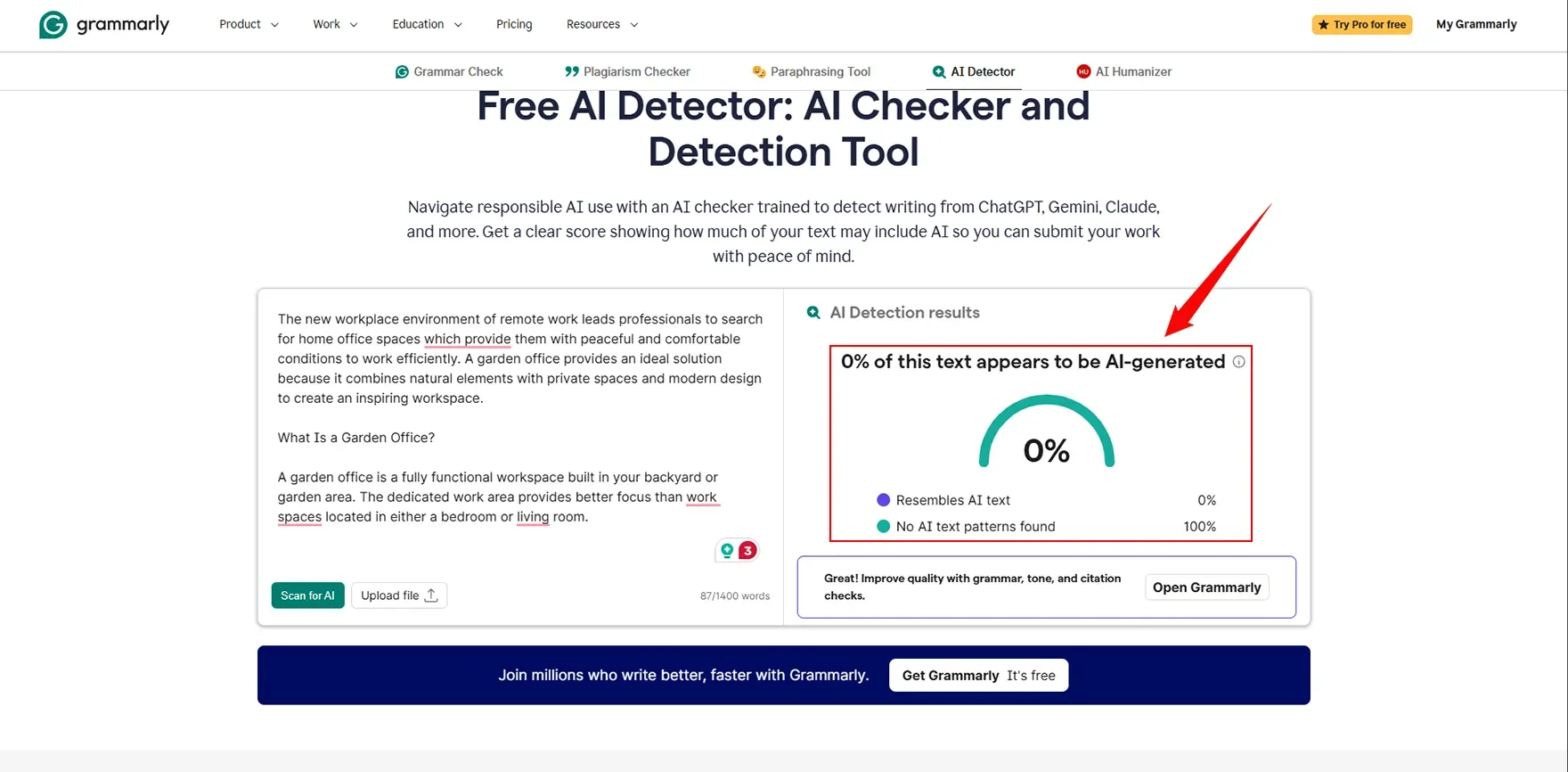
Grammarly Result: 0% AI,100% human Actual content Full conclusion: shows full humanized content with 0% AI detection.
AI checker Pro
Now I want to check this testing in AI Checker Pro, which shows specific results that will be defined as:
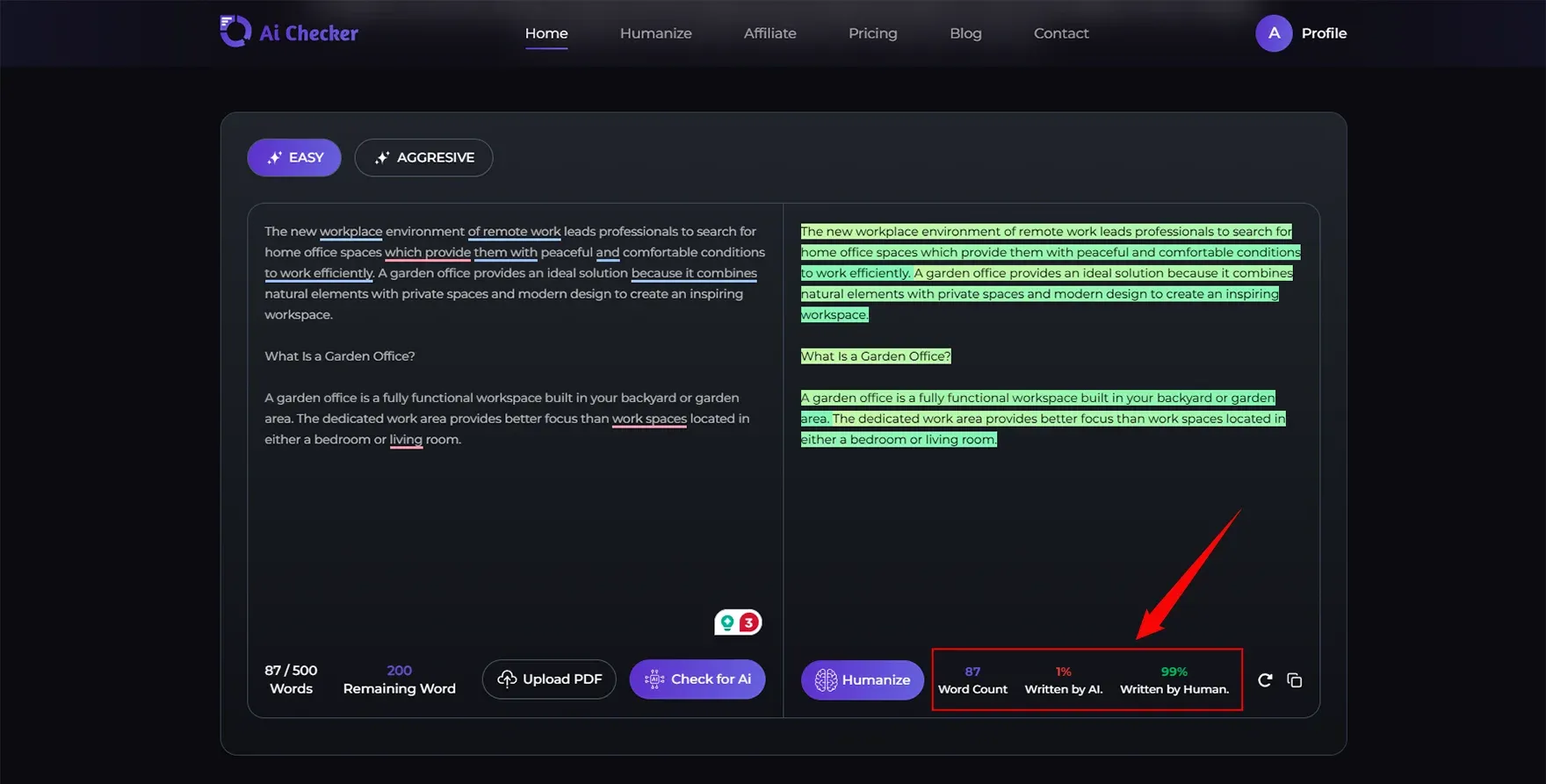
AI checker result: 1% AI, 99% Human. Actual Content:99% Humanised content. Full conclusion: it shows it got work and shows a positive sign about the detection of content.
Copyleaks
I want to again check this content in copyleaks which shows as follows:
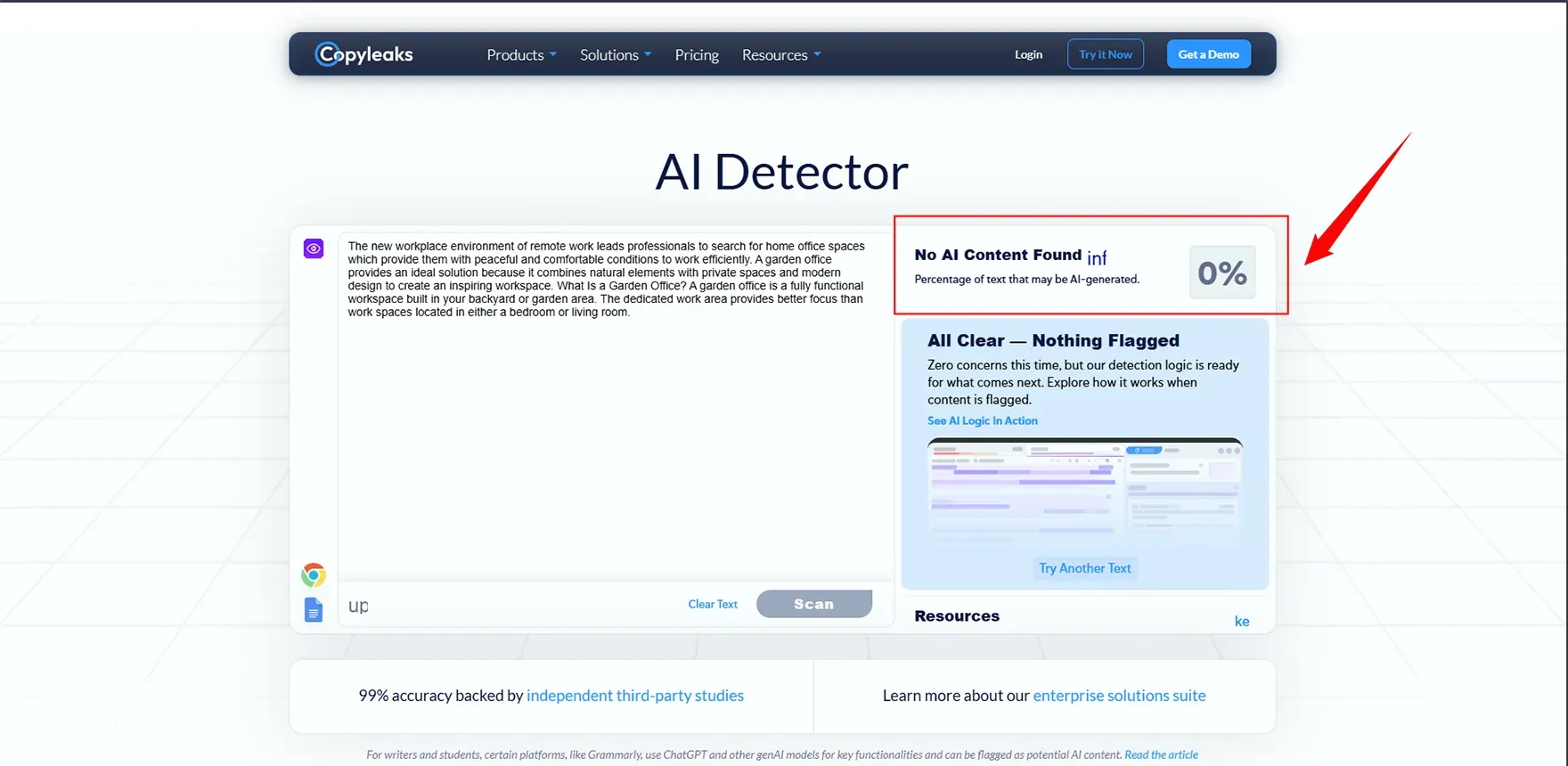
In this section we've seen that our humanized content shows 0% of AI detection and 100% humanized content which shows grammarly is best for AI detection and if you want to get the best alternative use our AIchecker.pro which shows the maximum efficiency with best results.
These inconsistent results across different detectors highlight the importance of choosing the right AI detection model for your specific needs, as each tool uses different algorithms and training data.
Grammarly AI Detector Features & Capabilities
The system provides access up to 10000 characters, so users can analyze without needing to create an account. The system tests results through a percentage score, which shows the exact amount of AI-generated content and human-created content.
The Grammarly extension provides complete integration, which enables users to work efficiently without interruptions. The system displays results to users within two seconds.
The system cannot provide in-depth explanations, and it cannot perform detailed sentence assessments or process multiple documents simultaneously or connect with educational software systems. The system has a restriction that prevents users from processing documents that exceed 10000 characters at one time.
Pros of Grammarly AI Detector
1. User-Friendly Interface The tool provides users with exceptional ease of use. Users need to paste their text into the system, which will deliver immediate results. The system requires no technical skills to operate because it provides users with a straightforward interface that contains essential functions only.
2. Fast Scanning Speed The system processes information with almost immediate speed. The system delivers results to users without requiring them to wait for multiple minutes, unlike some competing systems.
3. No Account Required for Basic Use You do the actual AI detection using Grammarly and can get away with not going through the registration process, perfectly fitting into instances where quick checks are needed.
4. Integrated Grammar Checking If you are a Grammarly subscriber now, you would be able to use the AI detector alongside your tool of on-the-go and grammar checkers.
5. Free Tier Available Most blog posts, emails, and short documents, or almost anything in that genre, are quite restricted from crossing the 10,000-character limit.
Cons of Grammarly AI Detector
1. Inconsistent Detection Results It seems that users keep running the same text over and over again and getting wildly inconsistent results. Suddenly, nothing is in AI, and then it's 35% AI without any change in the content. These fluctuations raise serious questions about reliability, which is why understanding AI detector accuracy metrics becomes essential when evaluating any detection tool for professional or academic use.
2. High False Positive Rate While redirected to a structurally incomprehensible black hole, an AI-generated piece was subsequently tagged as human-written-to with.
3. Easy to Bypass with Paraphrasing The detector becomes nearly ineffective when users apply basic rewording or A-text-through paraphrasing tools. The system fails to handle fundamental methods of content alteration.
4. Limited Free Tier The 10,000-character limit suggests that analyzing longer documents involves breaking them down into pieces, likely affecting accuracy.
5. Expensive Paid Plans The fixed AI-like text can be reset to read with human language as: 'If one compares with the specialized AI-based tools that beat accuracy, the price feels too high.
6. Poor Customer Support Users report two problems,which include difficulties when trying to cancel their subscriptions and obtain refunds. The response times to solve their problems take too long to meet their needs.
7. Lack of Transparency Grammarly does not reveal its detection algorithm details, and it does not disclose which models its system relies on or the intervals at which its system receives updates.
Grammarly AI Detector Pricing Breakdown
Free Plan ($0/month), which costs no money, provides basic AI detection across 10,000 character limits without requiring users to create an account. The system shows frequent errors when trying to measure character limits. The system works best for users who require basic assistance with their needs.
Pro Plan ($12-30/month) provides a complete AI detection service together with plagiarism detection and access to 2000 AI prompts and premium grammar assessment capabilities. The service costs $30 per month, which makes it expensive for users who need AI detection only. The software becomes valuable for users who need to use all of Grammarly's features throughout the entire day.
Enterprise Plan (Custom Pricing) offers customized pricing, which includes all Pro features and gives clients dedicated support and access to unlimited prompts. The organization requires a sales contact because they use premium pricing for its large corporate clients.
Reality Check: AI detection tools provide more precise results, which cost less money because they enable users to purchase one-time credits instead of needing to pay for monthly subscriptions.
Can Universities Detect If You Use Grammarly?
The use of Grammarly for grammar checking is different from AI-based content generation. Universities create a distinction between editing help that students can use and AI-generated content, which they must not use. To understand the specific detection methods institutions employ, you can learn about which AI detectors colleges actually use for verifying student work authenticity.
The acceptable corrections include grammar mistakes, style errors, vocabulary problems, and structural defects.
The problematic behavior includes using AI writing tools to create sentences, using AI to rewrite text, and submitting content that is AI-generated.
Turnitin detects AI-generated writing patterns that grammar-checking tools do not identify. You will encounter no problems if you create your own content and use Grammarly for editing your work. You must always verify your institution's academic integrity policy.
How to Avoid False Positives in Grammarly AI Detection
If you are being falsely flagged as AI, implement the following strategies to overcome the issue:
Write Naturally: Use a variety of sentence lengths, add anecdotes about yourself, select more conversational transitional phrases, and avoid using the same style throughout your writing. For a deeper dive into enhancing your writing style, check out our guide on improving your writing to pass AI detection with practical techniques that maintain authenticity.
Add Human Touches: Give your own opinion about something, include rhetorical questions, use different types of vocabulary, and implement stylistic choices on purpose.
What Makes False Positive Detectible: Overly formal, polished writing, consistently long paragraphs with no variation in length or punctuation, perfect spelling and grammatical usage without any variance, generic transitional phrases without personal voice between sentences.
Tip: No AI detection method is always correct; if someone questions your writing process, explain your writing process instead of simply accepting the machine's answer as final.
Best Grammarly AI Detector Alternatives
Various grammarly AI detectors that have to be mentioned, which are essential to understand, as follows:
1. AI Checker pro Accuracy: 84.84% | Pricing: $7.99/month. Best for content publishers and SEO professionals. The system provides four main features, which include plagiarism detection,fact verification, readability assessment, and bulk document scanning.
2. Turnitin The academic gold standard for plagiarism and AI detection. The system provides complete database access to users and provides tools for managing assignments. The system is not accessible for single-user operation.
3. GPTZero
The system provides accurate results for 65 percent of its three testing methods, which include a free version and a premium subscription starting at $9.99 per month. The system provides free access to users, which works well for educators and learners. Students looking for reliable verification tools should explore our detailed analysis of the best AI checker tools for students, which compares features, pricing, and accuracy across multiple platforms.
4. Copyleaks
The system can correctly identify content 75% of the time, and the service charges 10.99 dollars per month for access to 100 pages.
Grammarly AI Detector vs. Competitors: Quick Comparison
| Feature | Grammarly | AI Checker Pro | GPTZero | Turnitin | Copyleaks |
|---|---|---|---|---|---|
| Accuracy | 22% | Not disclosed (Moderate) | 65% | 80%+ | 75% |
| Free Tier | Yes | Yes (Limited) | Yes | No | Trial only |
| Price | $30/mo | Varies (Freemium model) | $10/mo | Institutional | $11/mo |
| Character Limit | 10,000 | Varies (Depends on plan) | 5,000 | Varies | Varies |
| Plagiarism Check | Premium | Not confirmed / Limited | No | Yes | Yes |
| Best For | Casual use | Bloggers & SEO content checks | Education | Academia | Enterprise |
For a more detailed breakdown of features, accuracy testing, and use cases, explore our comprehensive comparison of AI content detection tools to make an informed decision based on your specific requirements.
Is Grammarly AI Detector Worth It?
For casual checks, it should also be noted that the very method that will be discussed here makes particular use of a specific assumption.
For serious verification, 22.22% of accuracy is rather low for important authenticity-related decisions on important content.
For academics: Use Turnitin or GPTZero, created for educational contexts.
For publishers: Invest in Originality.ai or Copyleaks for even better accuracy. Understanding the benefits of using AI content detection tools helps publishers maintain content quality standards and protect their brand reputation in an AI-saturated content landscape.
Who Should Use It: Writers needing an initial check, Grammarly Premium users using all-in-one functionality, or those who require instant results for no fees.
Who Should Avoid It: Publishers take credit for decisions, educators grade amply, and an algorithm distinguishes to the end customer what is genuine.
Better Alternative: Originality.ai presents itself as a role model excelling in detection capability, with an operating pain point of 84.84.
Conclusion
Grammarly AI Detector offers convenient, free AI detection with an easy-to-use interface, but its 22.22% accuracy rate makes it unreliable for serious content verification. The tool performs poorly because it cannot process paraphrased material, which results in unpredictable performance and excessive false identifications.
Grammarly's detector works for basic checks and initial screening purposes. The content publishers and educators who need accurate AI detection should use specialized tools such as Originality.ai, which has 84.84% accuracy, or established academic systems like Turnitin. For those serious about maintaining content authenticity, learning how to effectively detect AI content using multiple verification methods provides the most reliable approach to content verification.
Frequently Asked Questions
1. Is Grammarly AI detector free?
2. How accurate is Grammarly AI detector?
3. Can Grammarly AI detectors be bypassed?
4. Does Grammarly detect ChatGPT?
5. Will universities know if I use Grammarly?
6. What is the disadvantage of using a Grammarly AI detector?
7. Is Grammarly AI detector better than Turnitin?
8. Can Grammarly detect paraphrased AI content?
9. Does Grammarly check for plagiarism and AI?
10. What percentage of AI content does Grammarly flag?
11. Is there a word limit for Grammarly AI detectors?
12. Can I use a Grammarly AI detector for academic papers?

Megan Haris
Content writer at @Aichecker
I am a content writer at AI Checker Pro, where I craft engaging, SEO-optimized content to enhance brand visibility and educate users about our AI-driven solutions. My role involves creating clear, impactful messaging across digital platforms to drive engagement and support company growth.Get Started Free
Create a free account for advanced AI detection and scan history.
Trusted by thousands worldwide.
Recent Blog's
Discover how AI-powered content creation can elevate your website's reach and engage your audience like never before. Explore the real impact of AI on crafting content that connects.